Ported over from
Classic ASP Script«
(Updated to correct some code which is correct in the download but not correct in the Article. Copy and paste is your enemy at times.)
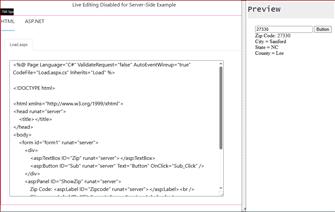
Using [ASP.NET] [C#] Version, we will look up the US Zip Code to find any zip code in the US in this easy-to-use code.
In this example, we will be using [ASP.NET (C#)].
When the user enters their Zip Code into the form, we will do the following.
(Protecting our Database from [
XSS Attacks])
Date: 07-30-2022 - Name changed of Function from ProtectSQL to ProtectXSS, as it was brought to my attention that saying SQL was misleading.
#1: Use a function that will protect our database from [
XSS] attacks called: [
ProtectXSS]
#2: Validate the form value against our database.
#3: Protect our Database from [
SQL injection] using [
Parameterized Queries].
#4: If the Zip Code [Does exist], we will display a message to the user, letting them know that the Zip Code exists
#5: If the ZIP Code [Does not exist], we will display a message indicating it does not exist.
The database includes over 5,000 ZIP Code entries and is available through this Article here:
A SQL Server Script for Zip Codes.«
[Section #1:]
The Script will also use a protection method to prevent [
XSS] and [
SQL Injection], as shown below and demonstrated in the demo code.
Example of the [
ProtectXSS] code.
(Corrected Code - 02-04-2026)
To use the Function in our ASP.NET website, we need to add the following line to the @ Page directive.
ValidateRequest="False"
And inside our Web.config, we need the following.
The below information was found on
HasanG from stackoverflow«
[Section #3:]
To protect ourselves from SQL Injections, we need to use [Parameterized Queries].
The following unsafe query was rapidly available when I first started learning ASP Classic.
(You can find examples of this poor code all over forums dating back to the late 90s and 2000s.
A protected Query for ASP.NET C#.
(Corrected Code - 02-04-2026)
[/p]